Click  to open the Pictorial Directory.
Click to open the Pictorial Directory.
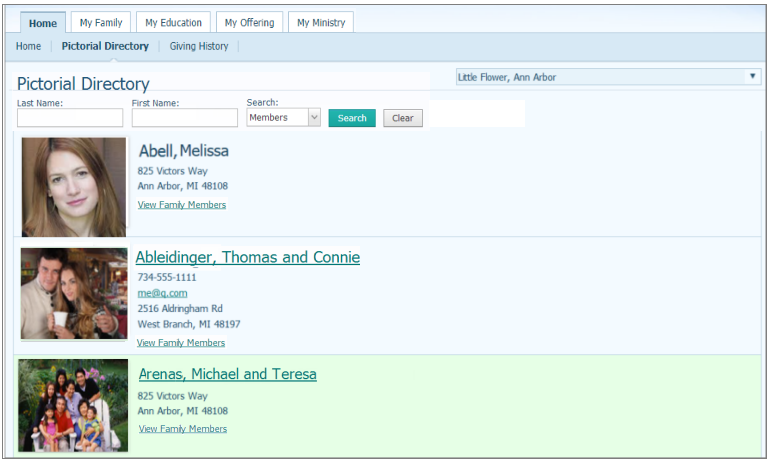
(optional) In the search fields, type the name of the family whose information you want to view. Then, click  .
.
Select the link for the family whose record you want to view.
The family's current information is displayed. For example:
 The form is in read-only mode.
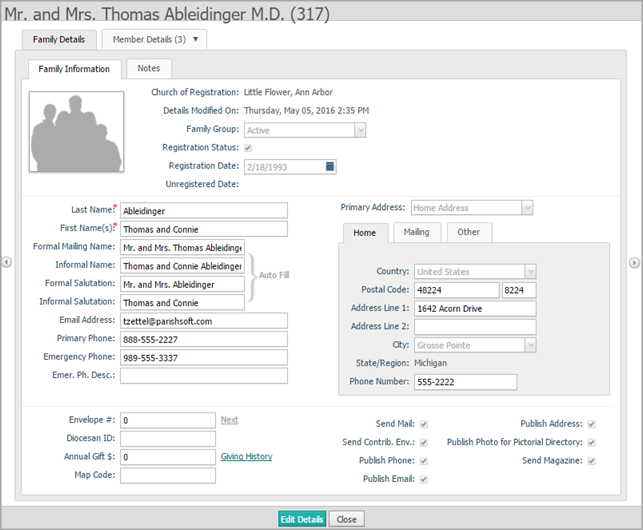
To update the record:
Click  .
.
The form is now in edit mode, enabling you to make changes.
Update the information in the record as desired. See Fields on the Family Details Form for descriptions of the form fields.
If you need to change or add a photo, under the photo click Change. For step-by-step instructions, go to How to Add, Change, or Delete a Family or Member Photo.
Do one of the following:
Click  to save changes to the form in the database. The form remains in edit mode to allow you to continue making changes.
Click  to save the changes and exit the form. You return to Pictorial Directory.
Click  to exit the form and return to the Pictorial Directory. You are prompted to cancel and lose change or continue editing.
Click  to cancel and exit without saving changes.
How to Search the Pictorial Directory
How to Add, Change, or Delete a Family or Member Photo
How to Use the Calendar to Set a Date