 to display the Invoices page.
After you finalize an invoice, you can apply payments to it. A finalized invoice is one whose status is either Ready or Partial. This topic shows you how to apply partial and full payments to a finalized invoice.
to display the Invoices page.This page lists all of your invoice records. Each record is active link to the customer's invoice. You can apply payments only to invoices whose status is Ready or Partial.

 to open the Apply
Payment window. For example:
to open the Apply
Payment window. For example: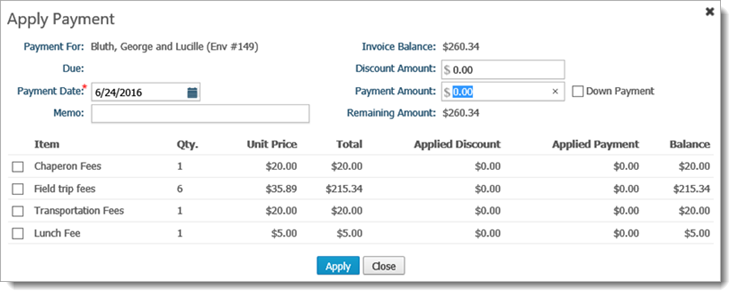
Payment details, including the customer's name, payment due date, and the invoice balance appear at the top of the window. Items billed on the invoice are listed at the bottom.
The Payment Date field shows today's date. The asterisk (*) indicates this is a required field.
 and
select the date you are applying the payment. Alternatively, type
the date in this field.
and
select the date you are applying the payment. Alternatively, type
the date in this field.The system applies the amount equally to all invoice items listed at the bottom of the window.
Click  .
.
Based on the payment amount you applied, the system updates these payment details:
Invoice Balance
Discount Amount (if applied)
Payment Amount
Click  to exit the window.