How to Update a Sacrament Record to Include the Parish Name and City
If an individual's sacrament record shows the name
of the parish only, you can use the instructions in this topic to update
the record to include the name of the city where the parish is located.
This
feature is particularly useful if you have parishes in your organization
that have the same name. Updating the record with the city name enables
you to differentiate them. Adding the city name to the record also enables
you to create a sacrament
certificate that shows the parish location.
 Your ability
to see sacrament data is controlled by your diocese. If your diocese chooses
to hide a specific sacrament, the sacrament does not appear in the Sacraments dropdown list. If your
diocese chooses to hide all sacraments, the Sacraments
button is not available.
Your ability
to see sacrament data is controlled by your diocese. If your diocese chooses
to hide a specific sacrament, the sacrament does not appear in the Sacraments dropdown list. If your
diocese chooses to hide all sacraments, the Sacraments
button is not available.
Click  .
Select Add/Edit Sacraments to display
the Sacraments page.
.
Select Add/Edit Sacraments to display
the Sacraments page.
If you manage multiple organizations,
select the desired organization from the Organization
list.
Locate the desired sacrament
record by entering filter criteria and searching your database for
the member's sacrament record. To do this, complete these steps:

- From the Sacrament
menu, select the type of sacrament. For example, Baptism.
- Type the last name of the member, maiden name
(if applicable), and the first name in the filter fields provided.
- If you know the date or the date range when the
sacrament was conferred, select the Include
Date Range link and then select a date or date range from the
calendar
 .
.
Select the Remove link to remove a date or date range
from your search.
- Click
 .
.
If the application locates one or more sacrament
records that match your filter criteria, it displays the records in the
area below the filters.
In the following example, three baptism records
match the criteria entered for the search. The records are located under
the filters:

To edit a specific record,
click  (to the left of the record entry).
The selected sacramental record is displayed
in view-only mode. For example:

To
update the Parish field with the city
location:
Click
 to put the record in edit mode.
To
the left of the Parish
field, click  to
display the Organization
Search window:
to
display the Organization
Search window:
To ensure
that the sacrament record is linked to the parish location, you must add
the parish name by clicking and completing
the search process. The system does not allow you to copy and paste the
parish name into the Parish field.

To
locate the desired parish, type one or more search criteria in the
search fields at the top of the window. Then, click .
One or more organizations matching your search
criteria are displayed at
the bottom of the window.
Select
the desired organization. Then, click  .
.
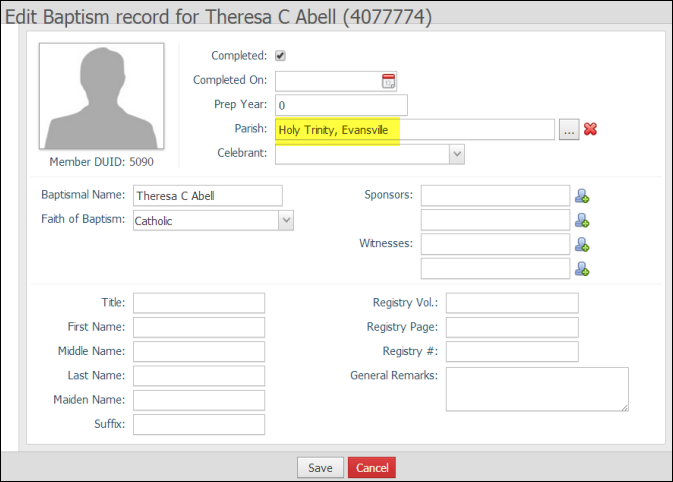
The sacrament record is re-displayed. The
Parish field is updated with
the name and location of the
organization you selected:
Do
one of the following:
If
the correct parish name is displayed, click  to update the record.
If
the wrong parish name is displayed, repeat Steps 4b - 4e to add one.
Then, click to update
the record.
A message is displayed to inform you
that the sacrament record was updated successfully.
Click
 to dismiss the message.
Related Topics
How to Create a
Sacrament Certificate
<Back
to top>